# TradingView and uSmart Automated Trading Tutorial
TradingView multi-condition alert Webhook cannot directly send trading instructions to uSmart. uSmart Open API is provided for developers to actively call, requiring certain technical expertise, involving identity authentication and interface parameter assembly, and is not a passive receiver of Webhook requests. To achieve automated trading, you must build a Webhook server to receive TradingView alert signal requests, parse callback information, and call uSmart Open API to place orders.
# Workflow
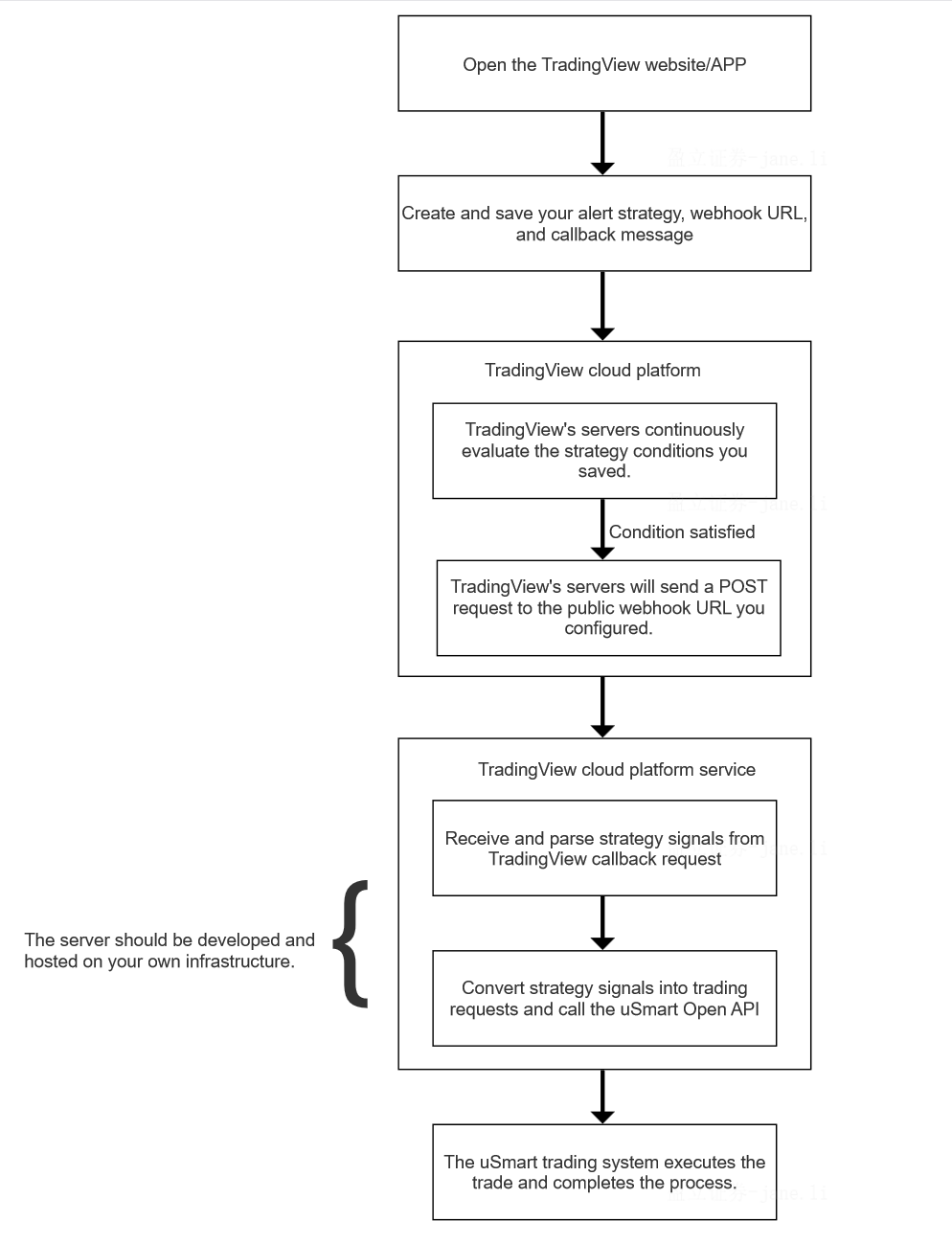
# Step-by-Step Implementation Guide
# Step 1: Enable uSmart Open API Service
This is the trading execution terminal. You need to prepare the integration environment.
- Open a securities account: uSmart Securities Open API is only open to customers who have opened an account and have assets in uSmart Securities.
- Enable API permissions: Apply for permissions and obtain keys through the link https://hk.usmartglobal.com/zh-hk/open-api (opens new window)
- Develop API integration: API documentation address https://api-doc.usmart.sg/ (opens new window)
# Step 2: Develop, Build and Deploy Webhook Server
Purchase a server and domain name, and resolve your domain name to the current server IP address.
# Install Web Server using Nginx
For Windows systems, you can download from the following link: https://nginx.org/en/download.html (opens new window), extract to the specified directory. Then start it:
start nginx.exe
Other useful commands are as follows:
nginx.exe -s stop
nginx.exe -s quit
nginx.exe -s stop
nginx.exe -s reload (reload)
Since TradingView can only use port 80, you need to set up port forwarding for your web server. Add the following configuration information in http:
server {
        listen 80;
        server_name your.dormain.com;
        charset utf-8;
        location / {
          proxy_pass http://localhost:8888;
        }
}
# Install Python Runtime Environment
Version 3.7.8, for Windows systems, you can download from the following link https://www.python.org/downloads/windows/ (opens new window), select executable for direct installation according to your system version.
Choose uSmart Open Api Python version for secondary development to implement WebHook callback interface and strategy callback message parsing to send trading requests. Demo download address: https://api-doc.usmart.sg/zh-cn/demo.html#%E4%BA%8C%E3%80%81python%E7%89%88%E6%9C%AC (opens new window)
Modify the web_server.py code, def doWebhook(self, request_data) callback main entry method.
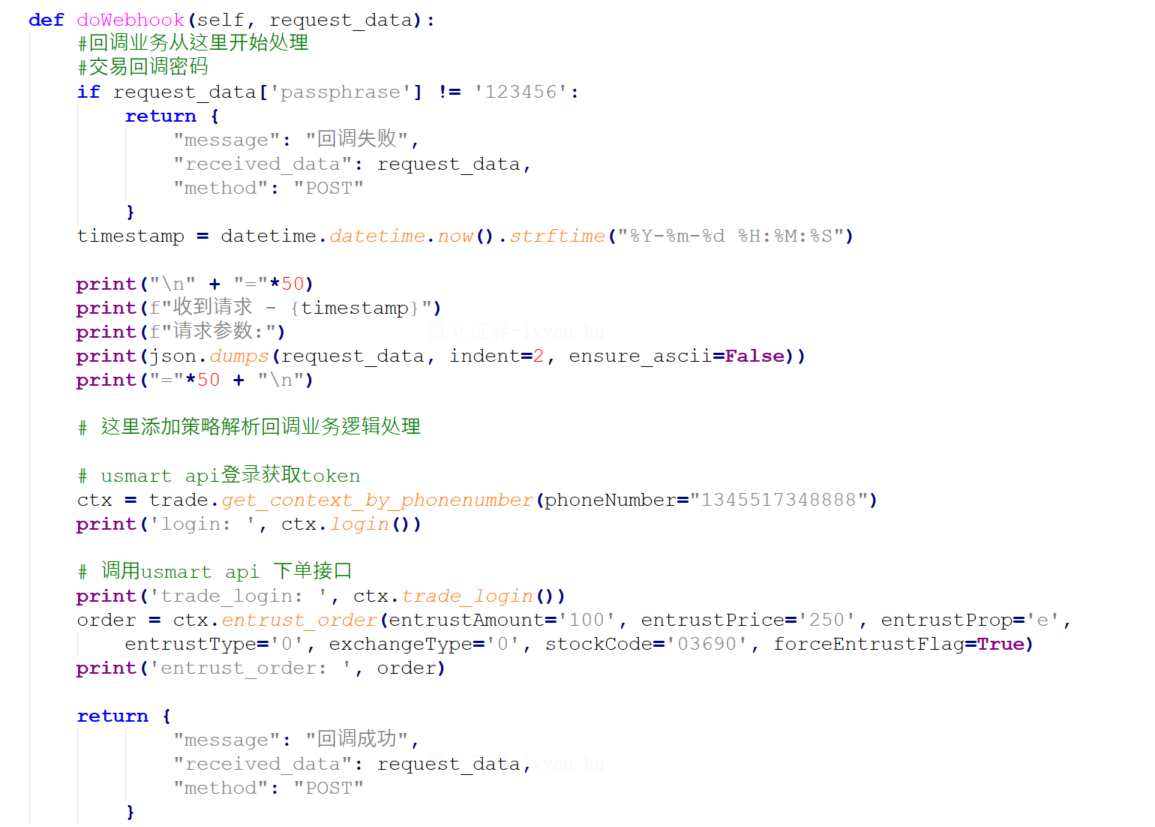 Note: WebHook callback interface and strategy callback message parsing to send trading requests need to be developed and implemented.
# Step 3: Create Webhook Alert in TradingView
When creating a webhook alert, check the Webhook Url option, then paste your webhook link, for example: http://www.your.domain/webhook, message body format example as follows:
{
"action": "{{strategy.order.comment}}",
"strategy_name": "us trading",
"symbol": "AAPL",
"exchange": "US",
"price":"{{strategy.order.price}}"
"passphrase": "your customized password for safety."
}